Mục tiêu: Lab thực chiến: Kết hợp AWS EKS, K8s On-Premise và GitOps Flow
1. TỔNG QUAN DỰ ÁN
Bối cảnh: Công ty “Perfectkey” yêu cầu xây dựng một hệ thống triển khai ứng dụng (CI/CD) đảm bảo tính sẵn sàng cao (High Availability) và khả năng phục hồi sau thảm họa (Disaster Recovery).
Thách thức chính:
- Hệ thống chính (Primary) chạy trên Cloud (AWS EKS) để phục vụ khách hàng toàn cầu với tốc độ cao.
- Hệ thống dự phòng (DR Site) chạy tại văn phòng (On-Premise) để đề phòng trường hợp Cloud bị sập (Region Outage) hoặc đứt cáp quang biển.
- Yêu cầu đặc biệt: Code nguồn phải được bảo mật nội bộ. Chỉ phiên bản Release mới được đẩy ra Public Cloud.
2. YÊU CẦU KỸ THUẬT (REQUIREMENTS)
Học viên cần hoàn thành các hạng mục sau:
A. Hạ tầng (Infrastructure Setup)
🏢 On-Premise (DR Site)
- Dựng cụm K8s Local.
- Dựng bộ công cụ Core: Jenkins, GitLab, Harbor.
- Thiết lập Cloudflare Tunnel để:
- Public DR App:
dr.diendo.com.vn -> Trỏ về Nginx Ingress Local. - (Optional) Kết nối ArgoCD Cloud về GitLab Local.
- Public DR App:
☁️ Cloud (Primary Site)
- Dựng AWS EKS (Production).
- Tạo AWS ECR (Registry).
- Tạo GitHub Repo (Public/Private) để chứa Config cho Production.
B. Quy trình CI/CD (Pipeline Workflow)
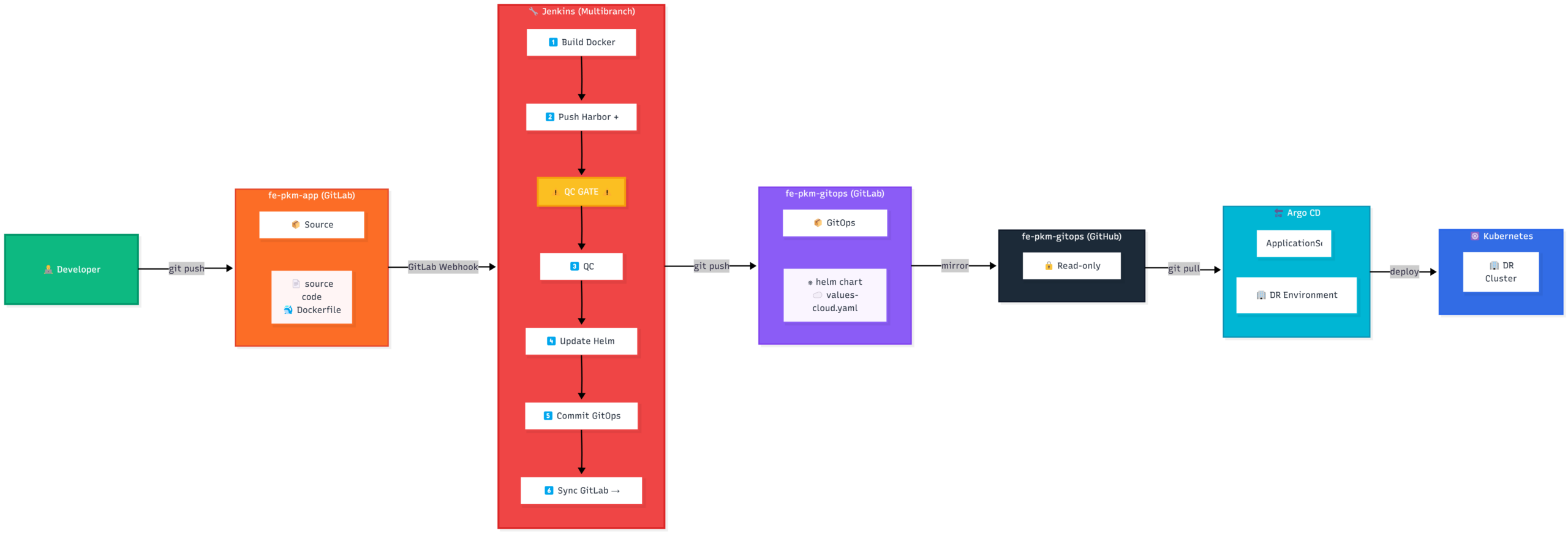
Sơ đồ luồng CI/CD từ Local lên Cloud
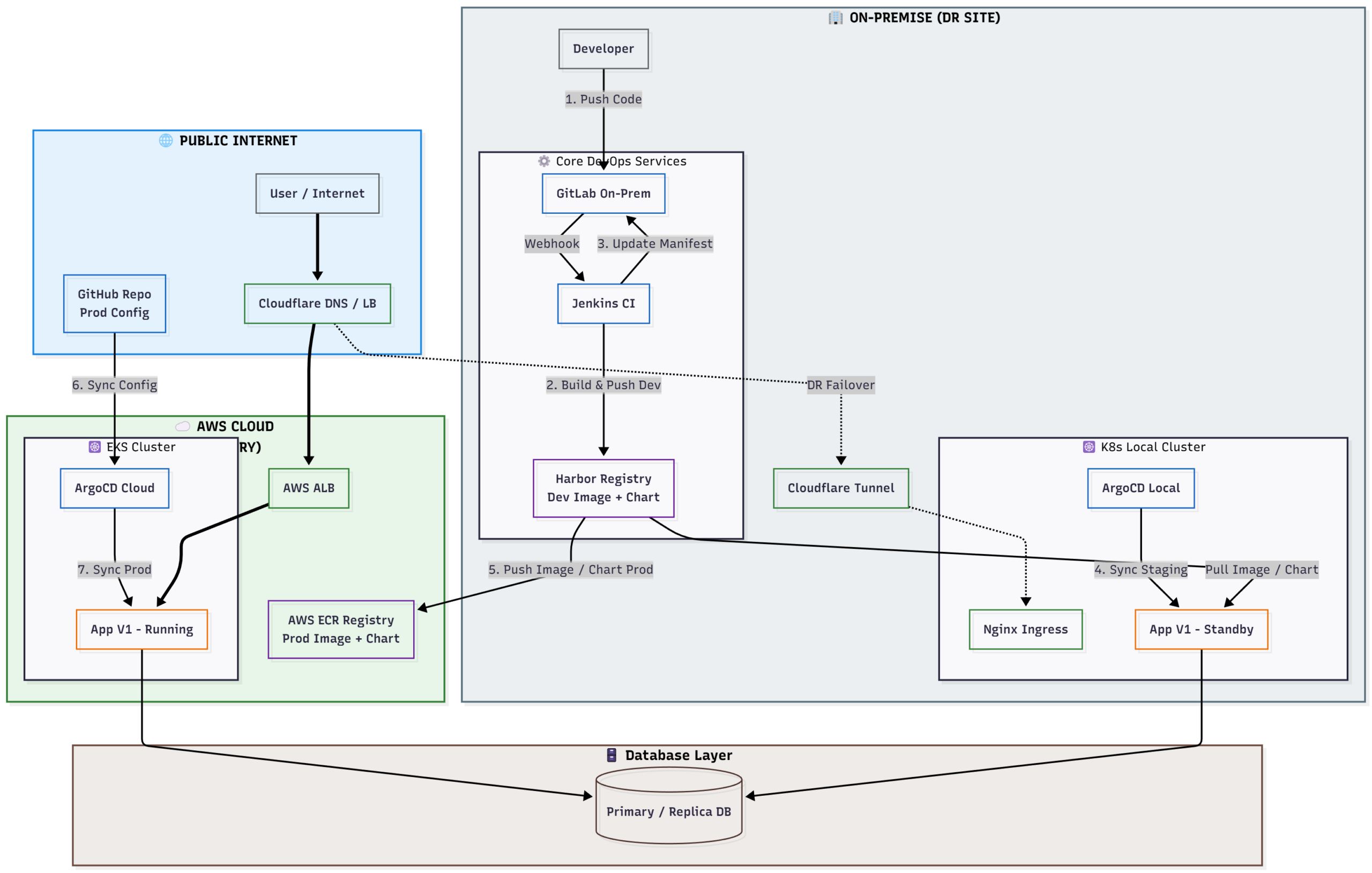
Viết Jenkinsfile thực hiện luồng công việc sau:
- Giai đoạn Phát triển (Local Phase):
- Dev push code vào GitLab.
- Jenkins build Docker Image -> Push vào Harbor.
- Jenkins update manifest trên GitLab -> ArgoCD Local sync về K8s Local.
- Mục tiêu: Dev và QC test nội bộ tốc độ cao.
- Giai đoạn Kiểm duyệt (Quality Gate):
- Pipeline dừng lại, chờ QC bấm nút “Approve”.
- Giai đoạn Release (Promotion Phase):
- Jenkins đẩy Image từ Local lên AWS ECR.
- Jenkins đẩy Config (file
values-prod.yaml) lên GitHub. - ArgoCD Cloud sync từ GitHub -> Deploy lên EKS.
- ArgoCD Local sync từ GitLab -> Deploy lên K8s Local (Namespace
prod-dr) để làm Backup nóng.
C. Kịch bản DR (Disaster Recovery Test)
- Truy cập Web chính (
app.diendo.pro.vn) đang chạy trên AWS. - Giả lập sự cố: Tắt cụm EKS (hoặc scale về 0).
- Failover: Vào Cloudflare DNS, chuyển traffic trỏ về Tunnel (DR Site).
- Kết quả: Web vẫn hoạt động bình thường (chạy từ máy Local).
3. Thực hiên
Mô hình triển khai
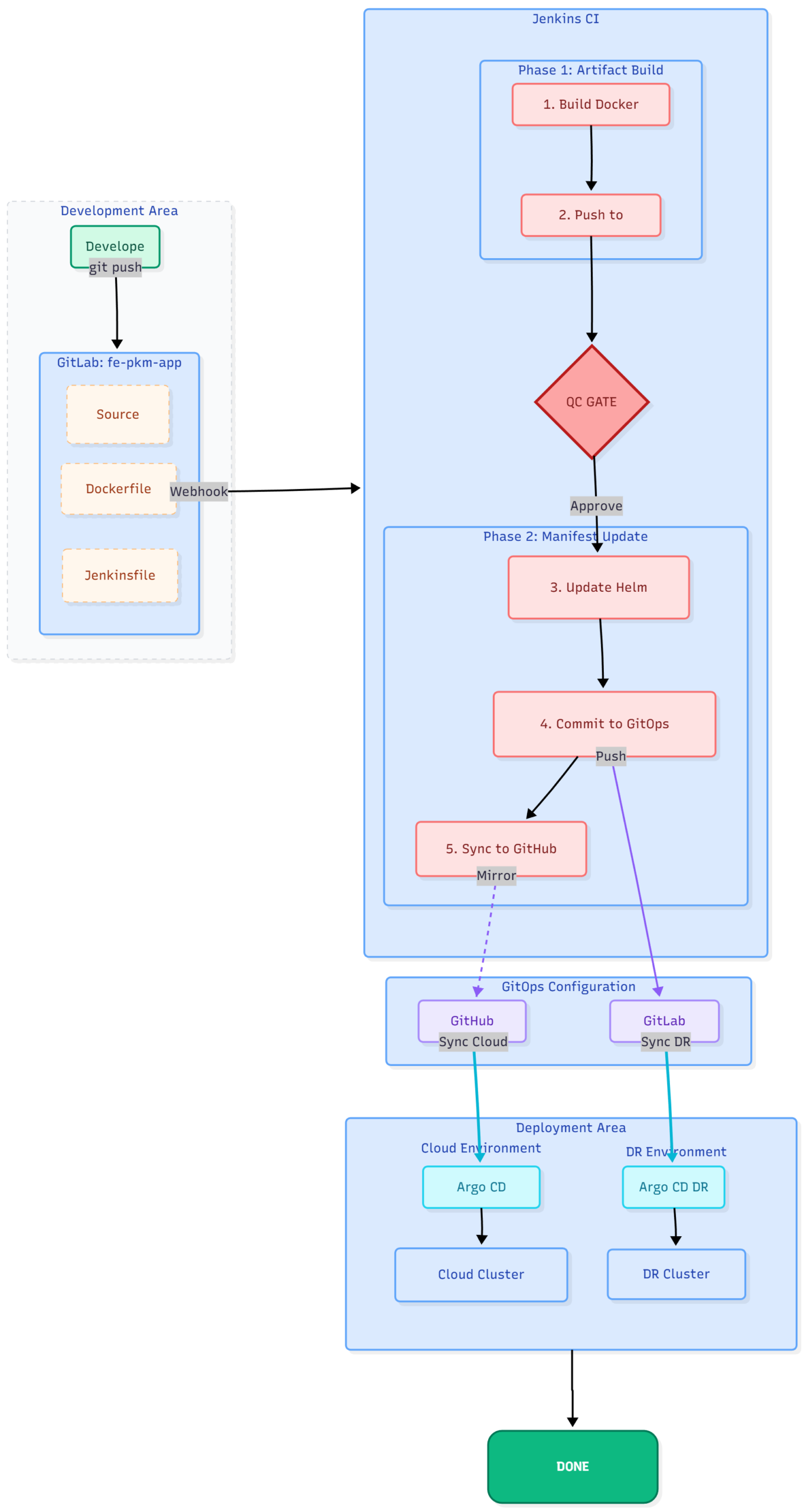
A. Cài đăt hạ tầng (Infrastruture)
On-Premise
- Cài đặt cụm k8s (xem tại đây)
- Cài đặt gitlab,npm.
Tạo proxy_network trên docker để kết nối các component của docker
docker network create -d macvlan --subnet=10.100.1.0/24 --ip-range=10.100.1.48/28 --gateway=10.100.1.8 -o macvlan_mode=bridge -o parent=ens160 proxy_networkfile docker-compose.yaml
version: '3.8'

services:
  # --- SERVICE 1: TECHNITIUM DNS SERVER (IP: .50) ---
  dns-server:
    image: 'technitium/dns-server:latest'
    container_name: dns-server
    hostname: dns.diendo.pro.vn
    restart: always
    ports: ["5380:5380/tcp"] # Web UI
    volumes: ["./technitium-config:/etc/dns"]
    environment: ["TZ=Asia/Ho_Chi_Minh"]
    networks:
      proxy_network: { ipv4_address: 10.100.1.50 }

  # --- SERVICE 2: NGINX PROXY MANAGER (NPM) (IP: .55) ---
  nginx-proxy-manager:
    image: 'jc21/nginx-proxy-manager:latest'
    container_name: nginx-proxy-manager
    restart: always
    ports:
      - '80:80'         # HTTP
      - '81:81'         # Web UI
      - '443:443'       # HTTPS
    environment:
      DB_MYSQL_HOST: "10.100.1.54"
      DB_MYSQL_PORT: 3306
      DB_MYSQL_USER: "npm"
      DB_MYSQL_PASSWORD: "npm_password"
      DB_MYSQL_NAME: "npm_db_1"
    volumes:
      - ./nginx/data:/data
      - ./nginx/letsencrypt:/etc/letsencrypt
    networks:
      proxy_network:
        ipv4_address: 10.100.1.55

  npm-db-1:
    image: 'mariadb:10.5'
    container_name: npm-db-1
    restart: always
    environment:
      MYSQL_ROOT_PASSWORD: 'npm_rootpass'
      MYSQL_DATABASE: 'npm_db_1'
      MYSQL_USER: 'npm'
      MYSQL_PASSWORD: 'npm_password'
    volumes:
      - ./mysql:/var/lib/mysql
    networks:
      proxy_network:
        ipv4_address: 10.100.1.54

  rancher:
    image: rancher/rancher:v2.12.0
    container_name: rancher
    restart: always
    privileged: true
    environment:
      CATTLE_BOOTSTRAP_PASSWORD: "BeoBeo...@2025"
    volumes:
      - ./rancher/data:/var/lib/rancher
    networks:
      proxy_network:
        ipv4_address: 10.100.1.56
    ports:
      - "443:443"

  # --- SERVICE 3: GITLAB-EE (IP: .51) ---
  gitlab:
    image: 'gitlab/gitlab-ee:latest'
    container_name: gitlab
    restart: always
    hostname: 'gitlab.diendo.pro.vn'
    environment:
      GITLAB_OMNIBUS_CONFIG: |
        external_url 'http://gitlab.diendo.pro.vn' # Initial, overridden by gitlab.rb
        gitlab_rails['initial_root_password'] = 'BeoBeo...@2025'
    volumes:
      - './gitlab/config:/etc/gitlab' # Source of Truth for config
      - './gitlab/logs:/var/log/gitlab'
      - './gitlab/data:/var/opt/gitlab'
    shm_size: '256m'
    dns: ["10.100.1.50", "1.1.1.1"] # Use internal DNS
    ports: ['22:22', '5050:5050'] # SSH, Registry internal port
    networks:
      proxy_network: { ipv4_address: 10.100.1.51 }

  # --- SERVICE 4: GITLAB RUNNER (IP: .52) - Optional ---
  gitlab-runner:
    image: 'gitlab/gitlab-runner:latest'
    container_name: gitlab-runner
    privileged: true
    depends_on: [gitlab]
    restart: always
    volumes: ['./runner-config:/etc/gitlab-runner', '/var/run/docker.sock:/var/run/docker.sock'] # SECURITY RISK
    dns: ["10.100.1.50", "1.1.1.1"]
    networks:
      proxy_network: { ipv4_address: 10.100.1.52 }

  # --- SERVICE 5: JENKINS (IP: .53) - All-in-One ---
  jenkins:
    build: { context: ./jenkins } # Use custom Dockerfile
    # container_name removed to fix DNS webhook issue
    restart: unless-stopped
    privileged: true # Insecure: Needed for docker.sock
    user: root       # Insecure: Needed for docker.sock permissions
    volumes:
      - ./kube/.kube:/root/.kube        # Optional K8s config
      - ./kube/.minikube:/root/.minikube # Optional K8s config
      - ./jenkins/jenkins_home:/var/jenkins_home # Persist Jenkins data
      - '/var/run/docker.sock:/var/run/docker.sock' # Insecure: Access host Docker
    dns: ["10.100.1.50", "1.1.1.1"] # Use internal DNS
    networks:
      proxy_network: { ipv4_address: 10.100.1.53 }

# --- GLOBAL NETWORK CONFIGURATION ---
networks:
  proxy_network:
    external: true # Use the pre-created MACVLAN network
Chạy lệnh docker compose up -d
Cài đặt jenkins qua docker. Dockerfile
# Start from the official Jenkins LTS image using JDK 17
FROM jenkins/jenkins:lts-jdk17
# Switch to root user to install packages
USER root
# Install prerequisites and Docker GPG key
RUN apt-get update && apt-get install -y ca-certificates curl gnupg
RUN install -m 0755 -d /etc/apt/keyrings
RUN curl -fsSL https://download.docker.com/linux/debian/gpg -o /etc/apt/keyrings/docker.asc
RUN chmod a+r /etc/apt/keyrings/docker.asc
# Add Docker repository
RUN echo \
  "deb [arch=$(dpkg --print-architecture) signed-by=/etc/apt/keyrings/docker.asc] https://download.docker.com/linux/debian \
  $(. /etc/os-release && echo "$VERSION_CODENAME") stable" | \
  tee /etc/apt/sources.list.d/docker.list > /dev/null
# Install Docker CLI
RUN apt-get update && apt-get install -y docker-ce-cli
RUN curl -fsSL "https://dl.k8s.io/release/$(curl -L -s https://dl.k8s.io/release/stable.txt)/bin/linux/amd64/kubectl" -o /usr/local/>
        && chmod +x /usr/local/bin/kubectl /usr/bin/docker || true \
        && apt-get clean && rm -rf /var/lib/apt/lists/*

ENV HELM_VERSION=v3.17.4
RUN curl -L "https://get.helm.sh/helm-${HELM_VERSION}-linux-amd64.tar.gz" | tar -xz \
    && mv linux-amd64/helm /usr/local/bin/helm \
    && chmod +x /usr/local/bin/helm \
    && helm plugin install https://github.com/chartmuseum/helm-push

RUN curl "https://awscli.amazonaws.com/awscli-exe-linux-x86_64.zip" -o awscliv2.zip \
     && unzip awscliv2.zip \
     && ./aws/install \

# Switch back to jenkins user
USER jenkins

# Final verification check
RUN kubectl version --client && helm version && aws --version
Chạy lệnh docker compose build up -d
Cài đặt harbor xem ở đây (đọc phần 6)
Cài đặt argocd xem ở đây
Đến đây phần hạ tầng đã hoàn thành
- Cụm k8s local
- gitlab: https://gitlab.diendo.pro.vn
- npm: https://npm.diendo.pro.vn
- jenkin: https://jenkins.diendo.pro.vn
- habor: https://harbor.diendo.pro.vn
- argocd: https://argocd.diendo.pro.vn
Triển khai ứng dụng trên On premise
1. Tạo project trên gitlab
- Login vào gitlab -> Tạo project
fe.pkm(để lưu source code) - Trên local gõ các lệnh
git clone http://gitlab.diendo.pro.vn/beobeo/fe.pkm.git
cd fe.pkm
git switch --create main
copy source vào thư mục fe.pkm
git add .
git commit -m "init project"
git push- Cấu trúc thư mục
fe.pkm
+---public
|
+---src
|   .env
|   .gitignore
|   .gitlab-ci.yml
|   Dockerfile
|   eslint.config.js
|   index.html
|   Jenkinsfile
|   nginx.conf
|   package.json
|   README.md
|   temp_checkout.js
| vite.config.js- Tạo project
fe-pkm-gitops
https://gitlab.diendo.pro.vn/beobeo/fe-pkm-gitops.git
cd fe-pkm-gitops
git switch --create main
copy source vào thư mục fe-pkm-gitops
git add .
git commit -m "init project"
git push- Cấu trúc thư mục
fe-pkm-gitops
helm
|   Chart.yaml
|   values-cloud.yaml
|   values-dr.yaml
|   values.yaml
\---templates
	| deployment.yaml
	| ingress.yaml
	| service.yaml
	| _helpers.tpl
Nội dung của các file trong helm
Chart.yaml
apiVersion: v2
name: fe-pkm
description: Frontend FE-PKM application (Helm OCI compatible)

type: application

# Version của Helm chart
# Jenkins sẽ update field này
version: 1.0.98

# Version của ứng dụng (image tag)
# Jenkins sẽ update field này
appVersion: "1.0.98"

keywords:
  - frontend
  - pkm
  - nginx

maintainers:
  - name: Diendt
    email: [email protected]

sources:
  - https://github.com/diendt/fe-pkm

icon: https://helm.sh/img/helm.svg
version: 1.0.98
appVersion: "1.0.98"
values.yaml
env: cloud

replicaCount: 2

image:
  repository: ""
  tag: ""
  pullPolicy: IfNotPresent

service:
  port: 80
  targetPort: 80
  nodePort: 32475

ingress:
  enabled: false
  host: ""
  className: nginx
values-cloud.yaml
env: cloud

image:
  repository: 474891441152.dkr.ecr.ap-southeast-1.amazonaws.com/beobeo/fe-pkm
  tag: "1.0.98"

imagePullSecrets:
  - name: ecr-registry

service:
  type: ClusterIP

ingress:
  enabled: true
  host: fe-pkm.diendo.pro.vn
values-dr.yaml
env: dr

image:
  repository:  harbor.diendo.pro.vn/fe-pkm/fe-pkm-ui
  tag: "1.0.98"

imagePullSecrets:
  - name: harbor-registry

service:
  type: NodePort
  nodePort: 32475

ingress:
  enabled: false
templates/_helpers.tpl
{{- define "fe-pkm.name" -}}
fe-pkm
{{- end }}

{{- define "fe-pkm.fullname" -}}
{{ include "fe-pkm.name" . }}-{{ .Values.env }}
{{- end }}
templates/deployment.yaml
apiVersion: apps/v1
kind: Deployment
metadata:
  name: {{ include "fe-pkm.fullname" . }}
spec:
  replicas: {{ .Values.replicaCount }}
  selector:
    matchLabels:
      app: {{ include "fe-pkm.name" . }}
  template:
    metadata:
      labels:
        app: {{ include "fe-pkm.name" . }}
    spec:
{{- if .Values.imagePullSecrets }}
      imagePullSecrets:
{{- toYaml .Values.imagePullSecrets | nindent 8 }}
{{- end }}
      containers:
        - name: fe-pkm
          image: "{{ .Values.image.repository }}:{{ .Values.image.tag }}"
          imagePullPolicy: {{ .Values.image.pullPolicy }}
          ports:
            - containerPort: {{ .Values.service.targetPort }}
templates/ingress.yaml
{{- if and (eq .Values.env "cloud") .Values.ingress.enabled }}
apiVersion: networking.k8s.io/v1
kind: Ingress
metadata:
  name: {{ include "fe-pkm.fullname" . }}
spec:
  ingressClassName: {{ .Values.ingress.className }}
  rules:
    - host: {{ .Values.ingress.host }}
      http:
        paths:
          - path: /
            pathType: Prefix
            backend:
              service:
                name: {{ include "fe-pkm.fullname" . }}
                port:
                  number: {{ .Values.service.port }}
{{- end }}
templates/service.yaml
apiVersion: v1
kind: Service
metadata:
  name: {{ include "fe-pkm.fullname" . }}
spec:
  type: {{ .Values.service.type }}
  selector:
    app: {{ include "fe-pkm.name" . }}
  ports:
    - port: {{ .Values.service.port }}
      targetPort: {{ .Values.service.targetPort }}
{{- if eq .Values.env "dr" }}
      nodePort: {{ .Values.service.nodePort }}
{{- end }}
2. Cấu hình gitlab và Jenkins (xem tại đây)
File Jenkinsfile
pipeline {
  agent any

  options {
    timestamps()
    disableConcurrentBuilds()
  }

  environment {
    VERSION = "1.0.${BUILD_NUMBER}"

    /* ========= IMAGE REGISTRY ========= */
    HARBOR_URL     = "harbor.diendo.pro.vn"
    HARBOR_PROJECT = "fe-pkm"
    HARBOR_IMAGE   = "fe-pkm-ui"
    HARBOR_CREDS  = "harbor-credentials-id"

    /* ========= HELM OCI ========= */
    HARBOR_HELM_REPO = "oci://harbor.diendo.pro.vn/fe-pkm/helm"

    /* ========= GITOPS ========= */
    GITOPS_REPO   = "http://gitlab.diendo.pro.vn/beobeo/fe-pkm-gitops.git"
    GITOPS_BRANCH = "main"
    GITOPS_CREDS  = "gitlab-credentials"

  }

  stages {

    stage('Checkout Source') {
      steps {
        checkout scm
      }
    }

    /* ================= IMAGE ================= */

    stage('Build Image') {
      steps {
        sh 'docker build -t fe-pkm-ui:$VERSION .'
      }
    }

    stage('Push Image') {
      parallel {

        stage('Harbor') {
          steps {
            withCredentials([usernamePassword(
              credentialsId: HARBOR_CREDS,
              usernameVariable: 'HARBOR_USER',
              passwordVariable: 'HARBOR_PASSWORD'
            )]) {
              sh '''
                set -e
                echo "$HARBOR_PASSWORD" | docker login $HARBOR_URL -u "$HARBOR_USER" --password-stdin

                docker tag fe-pkm-ui:$VERSION \
                  $HARBOR_URL/$HARBOR_PROJECT/$HARBOR_IMAGE:$VERSION
                docker push \
                  $HARBOR_URL/$HARBOR_PROJECT/$HARBOR_IMAGE:$VERSION
              '''
            }
          }
        }
      }
    }

    /* ================= QC ================= */

    stage('QC Approval') {
      steps {
        timeout(time: 24, unit: 'HOURS') {
          input message: "QC approve FE-PKM version ${VERSION}?",
                ok: "APPROVE",
                submitter: "qc-team"
        }
      }
    }

    /* ================= HELM ================= */
    stage('Clone GitOps Repo') {
      steps {
        withCredentials([usernamePassword(
          credentialsId: GITOPS_CREDS,
          usernameVariable: 'GL_USER',
          passwordVariable: 'GL_TOKEN'
        )]) {
          sh '''
            set -e

            rm -rf gitops

            export GIT_ASKPASS=/bin/echo
            export GIT_USERNAME=$GL_USER
            export GIT_PASSWORD=$GL_TOKEN

            git clone -b main https://gitlab.diendo.pro.vn/beobeo/fe-pkm-gitops.git gitops

          '''
        }
      }
    }

    stage('Build & Push Helm (GitOps Repo)') {
      steps {
        withCredentials([
          usernamePassword(
            credentialsId: GITOPS_CREDS,
            usernameVariable: 'GL_USER',
            passwordVariable: 'GL_TOKEN'
          ),
          usernamePassword(
            credentialsId: HARBOR_CREDS,
            usernameVariable: 'HARBOR_USER',
            passwordVariable: 'HARBOR_PASSWORD'
          )
        ]) {
          sh '''
            set -e

            # ===== Clone GitOps repo =====

            rm -rf gitops

            export GIT_ASKPASS=/bin/echo
            export GIT_USERNAME=$GL_USER
            export GIT_PASSWORD=$GL_TOKEN

            git clone -b main https://gitlab.diendo.pro.vn/beobeo/fe-pkm-gitops.git gitops

            cd gitops

            # ===== Update Chart version =====
            sed -i "s/^version:.*/version: $VERSION/" helm/Chart.yaml
            sed -i "s/^appVersion:.*/appVersion: \\"$VERSION\\"/" helm/Chart.yaml

            # ===== Package Helm =====
            helm package helm

            # ===== Push Helm → Harbor =====
            echo "$HARBOR_PASSWORD" | helm registry login harbor.diendo.pro.vn \
              --username "$HARBOR_USER" --password-stdin
            helm push fe-pkm-$VERSION.tgz $HARBOR_HELM_REPO

          '''
        }
      }
    }

    /* ================= GITOPS ================= */

    stage('Update GitOps Repo') {
      steps {
        withCredentials([usernamePassword(
          credentialsId: GITOPS_CREDS,
          usernameVariable: 'GL_USER',
          passwordVariable: 'GL_TOKEN'
        )]) {
          sh '''

            cd gitops

            sed -i "s|tag:.*|tag: \\"$VERSION\\"|" helm/values-cloud.yaml
            sed -i "s|tag:.*|tag: \\"$VERSION\\"|" helm/values-dr.yaml

            git config user.email "[email protected]"
            git config user.name "Jenkins CI"
            git add helm
            git commit -m "chore(release): fe-pkm $VERSION"
            git push origin $GITOPS_BRANCH
          '''
        }
      }
    }
  }

  post {
    success {
      echo "✅ FE-PKM ${VERSION} approved by QC & released"
    }
    always {
      cleanWs()
    }
  }
}
Commit và push code lên gitlab -> Jenkins sẽ build image, thay đổi tag, Chờ QC Approved
3. Triển khai ứng dụng qua ArgoCD
Tạo secret trên cụm k8s.
Chạy lệnh sau trên node master
kubectl create secret docker-registry harbor-registry \
  --docker-server=harbor.diendo.pro.vn \
  --docker-username=beobeo \
  --docker-password=<YOUR PASSWORD> \
  [email protected] \
  -n pkm-web
Login vào argocd theo địa chỉ: https://argocd.diendo.pro.vn
Tạo ứng dụng từ Settings
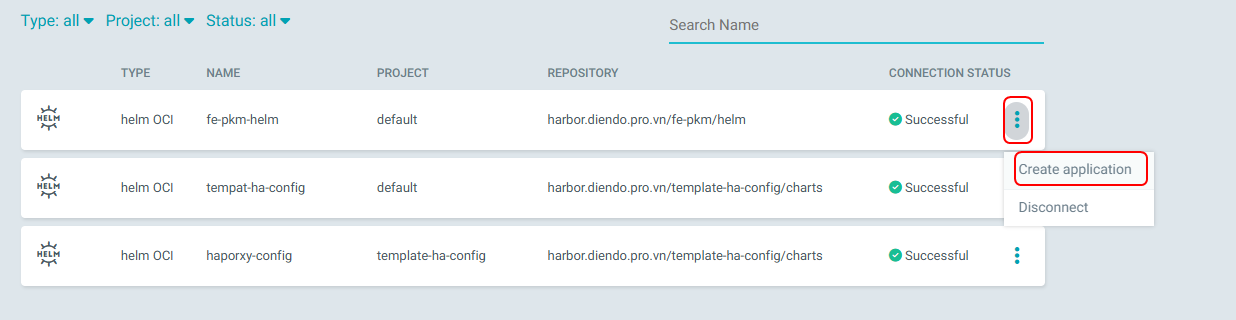
Nhập các thông tin như hình dưới
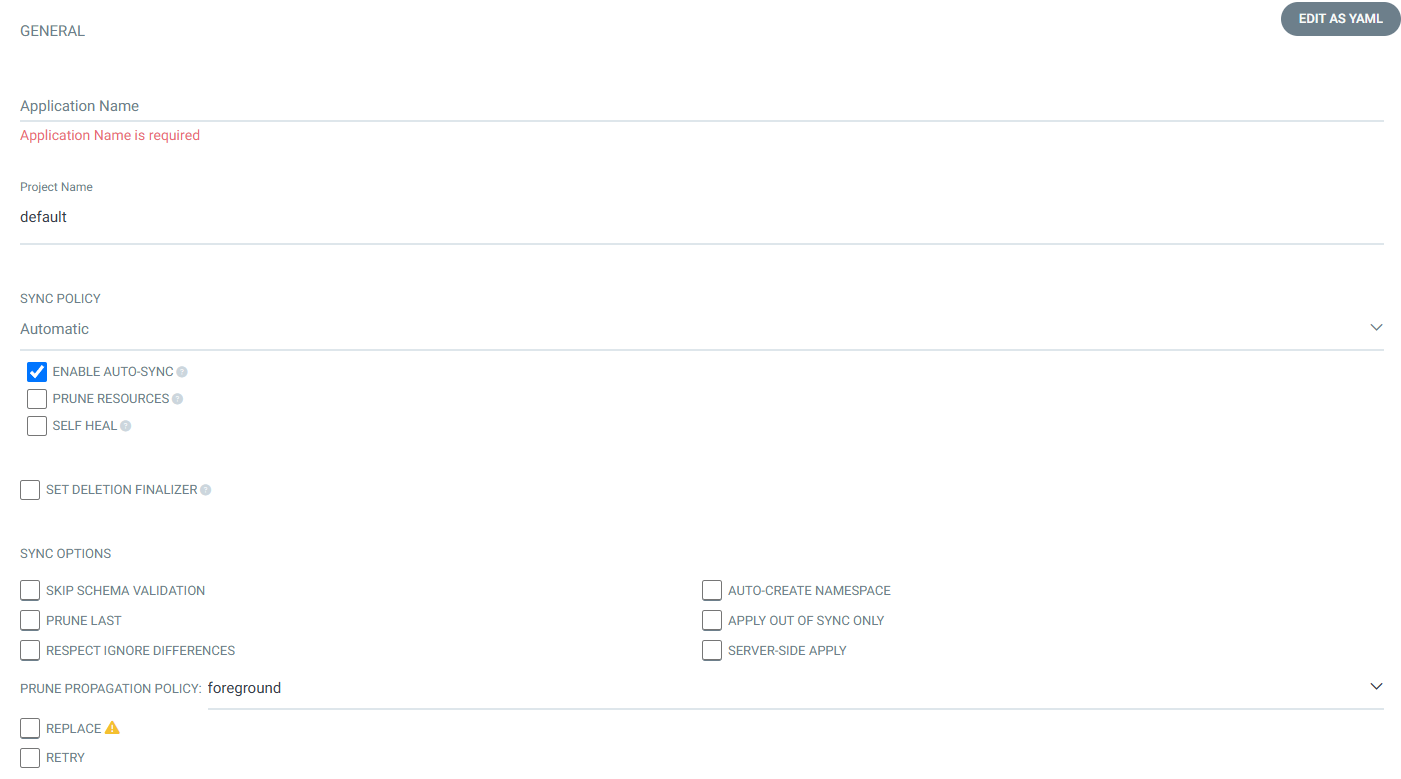
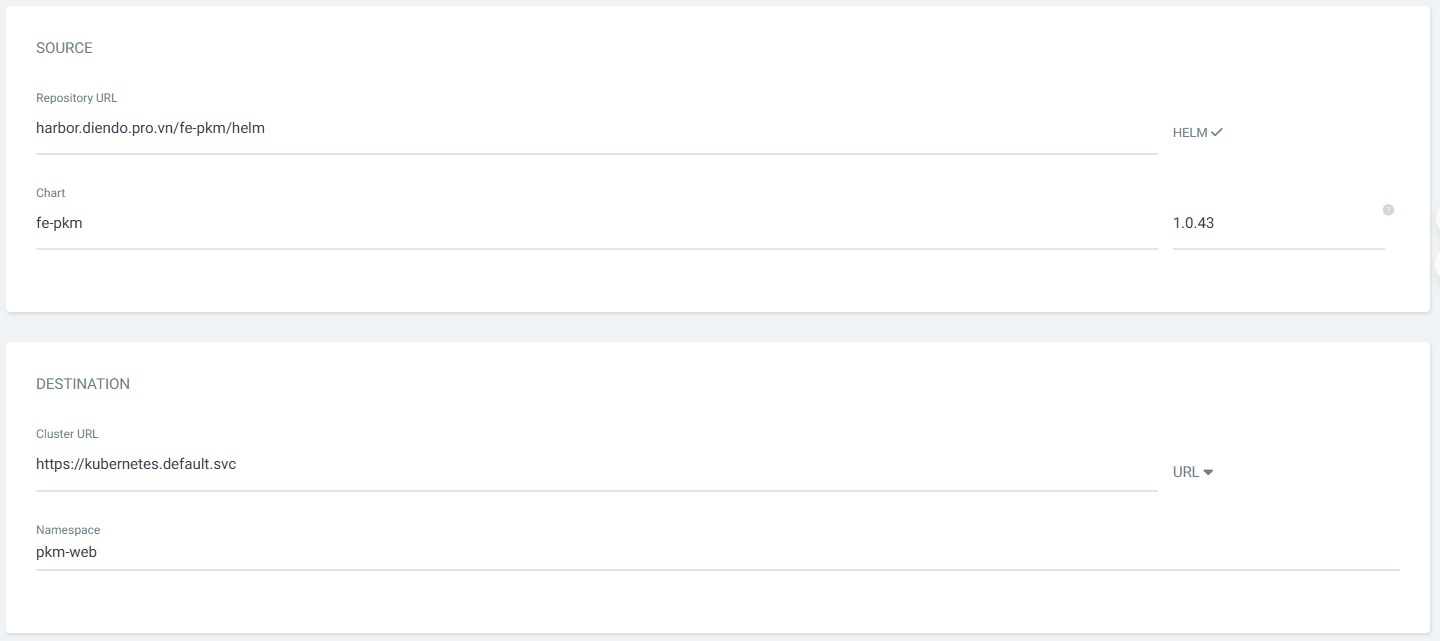
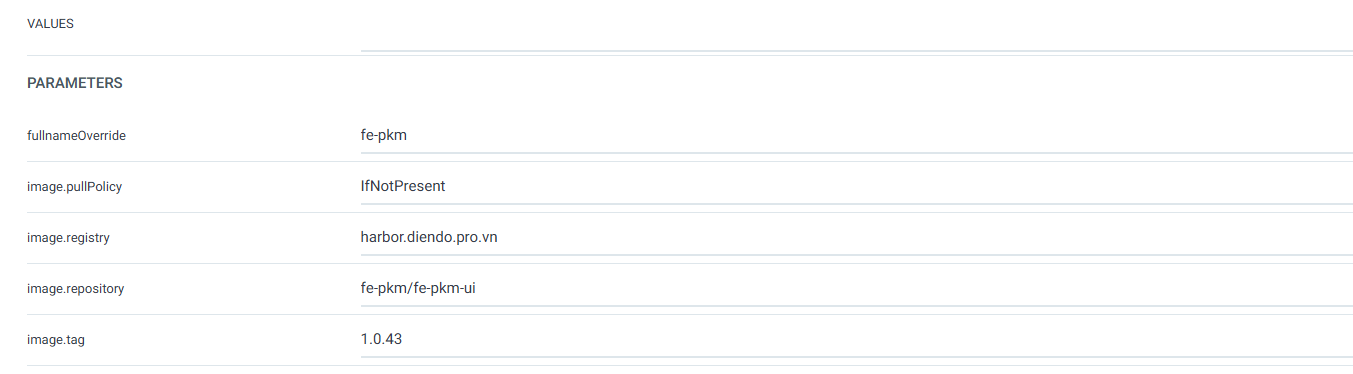
Như vậy On premise đã có site: http://fe-pkm-dr.diendo.pro.vn/login
☁️ Cloud (Primary Site)
Dựng AWS EKS (Production), xem ở đây.
Triển khai argocd trên aws (xem ở đây)
Triển khai Cert Manager trên EKS (xem ở đây)
Trển khhai AWS ALB Ingress Controller (xem ở đấy)
Tạo AWS ECR (Registry).
- Tạo repo chứa Docker Image
aws ecr create-repository ^
--repository-name beobeo/fe-pkm ^
--region ap-southeast-1 ^
--image-scanning-configuration scanOnPush=true ^
--encryption-configuration encryptionType=AES256- Tạo repo chứa helm
aws ecr create-repository ^
  --repository-name beobeo/fe-pkm-chart ^
  --region ap-southeast-1
Kết quả:
{
    "repository": {
        "repositoryArn": "arn:aws:ecr:ap-southeast-1:474891441152:repository/beobeo/fe-pkm",
        "registryId": "474891441152",
        "repositoryName": "beobeo/fe-pkm",
        "repositoryUri": "474891441152.dkr.ecr.ap-southeast-1.amazonaws.com/beobeo/fe-pkm",
        "createdAt": "2025-12-21T20:22:02.950000+07:00",
        "imageTagMutability": "MUTABLE",
        "imageScanningConfiguration": {
            "scanOnPush": true
        },
        "encryptionConfiguration": {
            "encryptionType": "AES256"
        }
    }
}
URL của repo: 474891441152.dkr.ecr.ap-southeast-1.amazonaws.com/beobeo/fe-pkm
- Gán IAM Policy cho ECR
IAM Policy: ECRPushPolicy dùng để Push image (dùng cho gitlab ci, jenkins, developer push image)
{
  "Version": "2012-10-17",
  "Statement": [
    {
      "Sid": "ECRAuth",
      "Effect": "Allow",
      "Action": "ecr:GetAuthorizationToken",
      "Resource": "*"
    },
    {
      "Sid": "ECRPushPull",
      "Effect": "Allow",
      "Action": [
        "ecr:BatchCheckLayerAvailability",
        "ecr:InitiateLayerUpload",
        "ecr:UploadLayerPart",
        "ecr:CompleteLayerUpload",
        "ecr:PutImage",
        "ecr:BatchGetImage",
        "ecr:DescribeRepositories"
      ],
      "Resource": "arn:aws:ecr:ap-southeast-1:474891441152:repository/beobeo/argocd-server"
    }
  ]
}
Tạo Policy: ECRPushPolicy
- Tạo file
ECRPushPolicy.jsoncó nội dung như ở trên - Chạy lệnh sau
aws iam create-policy ^
  --policy-name ECRPushPolicy ^
  --policy-document file://ECRPushPolicy.json
Attach policy cho user
aws iam attach-user-policy ^
  --user-name beobeo ^
  --policy-arn arn:aws:iam::474891441152:policy/ECRPushPolicy
IAM Policy ECRPullPolicy dùng cho pull image
{
  "Version": "2012-10-17",
  "Statement": [
    {
      "Sid": "ECRAuth",
      "Effect": "Allow",
      "Action": "ecr:GetAuthorizationToken",
      "Resource": "*"
    },
    {
      "Sid": "ECRPull",
      "Effect": "Allow",
      "Action": [
        "ecr:BatchGetImage",
        "ecr:GetDownloadUrlForLayer"
      ],
      "Resource": "arn:aws:ecr:ap-southeast-1:474891441152:repository/beobeo/argocd-server"
    }
  ]
}
Tạo Policy: ECRPullPolicy
- Tạo file
ECRPullPolicy.json - Chạy lệnh sau
aws iam create-policy ^
  --policy-name ECRPushPolicy ^
  --policy-document file://ECRPullPolicy.json
Attach Pull Policy
aws iam attach-role-policy ^
  --role-name beobeo_eks_worker ^
  --policy-arn arn:aws:iam::474891441152:policy/ECRPullPolicy
Triển khai hệ thống trên AWS
- Tạo secrect cho ecr
kubectl create secret docker-registry ecr-registry ^
  --docker-server=474891441152.dkr.ecr.ap-southeast-1.amazonaws.com ^
  --docker-username=AWS ^
  --docker-password=$(aws ecr get-login-password --region ap-southeast-1) ^
-n pkm-web- Cài đặt AWS CLI trên Jenkins Container
docker exec -it devops-jenkins-1 /bin/bash
curl "https://awscli.amazonaws.com/awscli-exe-linux-x86_64.zip" -o awscliv2.zip
unzip awscliv2.zip
sudo ./aws/install
Hoặc bổ sung vào Dockerfile của Jenkins, Nội dung Dockerfile
# Start from the official Jenkins LTS image using JDK 17
FROM jenkins/jenkins:lts-jdk17
# Switch to root user to install packages
USER root
# Install prerequisites and Docker GPG key
RUN apt-get update && apt-get install -y ca-certificates curl gnupg
RUN install -m 0755 -d /etc/apt/keyrings
RUN curl -fsSL https://download.docker.com/linux/debian/gpg -o /etc/apt/keyrings/docker.asc
RUN chmod a+r /etc/apt/keyrings/docker.asc
# Add Docker repository
RUN echo \
  "deb [arch=$(dpkg --print-architecture) signed-by=/etc/apt/keyrings/docker.asc] https://download.docker.com/linux/debian \
  $(. /etc/os-release && echo "$VERSION_CODENAME") stable" | \
  tee /etc/apt/sources.list.d/docker.list > /dev/null
# Install Docker CLI
RUN apt-get update && apt-get install -y docker-ce-cli
RUN curl -fsSL "https://dl.k8s.io/release/$(curl -L -s https://dl.k8s.io/release/stable.txt)/bin/linux/amd64/kubectl" -o /usr/local/bin/kubect>
        && chmod +x /usr/local/bin/kubectl /usr/bin/docker || true \
        && apt-get clean && rm -rf /var/lib/apt/lists/*

ENV HELM_VERSION=v3.17.4
RUN curl -L "https://get.helm.sh/helm-${HELM_VERSION}-linux-amd64.tar.gz" | tar -xz \
    && mv linux-amd64/helm /usr/local/bin/helm \
    && chmod +x /usr/local/bin/helm \
    && helm plugin install https://github.com/chartmuseum/helm-push

RUN curl "https://awscli.amazonaws.com/awscli-exe-linux-x86_64.zip" -o awscliv2.zip \
     && unzip awscliv2.zip \
     && ./aws/install

# Switch back to jenkins user
USER jenkins

# Final verification check
RUN kubectl version --client && helm version && aws --version
Jenkinsfile
pipeline {
  agent any

  options {
    timestamps()
    disableConcurrentBuilds()
  }

  environment {
    VERSION = "1.0.${BUILD_NUMBER}"

    /* ========= IMAGE REGISTRY ========= */
    HARBOR_URL     = "harbor.diendo.pro.vn"
    HARBOR_PROJECT = "fe-pkm"
    HARBOR_IMAGE   = "fe-pkm-ui"
    HARBOR_CREDS  = "harbor-credentials-id"

    AWS_REGION     = "ap-southeast-1"
    AWS_ACCOUNT_ID = "474891441152"
    ECR_REGISTRY   = "${AWS_ACCOUNT_ID}.dkr.ecr.${AWS_REGION}.amazonaws.com"
    ECR_REPO       = "beobeo/fe-pkm"
    AWS_CREDS      = "aws-ecr-creds"

    /* ========= HELM OCI ========= */
    HARBOR_HELM_REPO = "oci://harbor.diendo.pro.vn/fe-pkm/helm"
    ECR_HELM_REPO    = "oci://${ECR_REGISTRY}/${ECR_REPO}-chart"

    /* ========= GITOPS ========= */
    GITOPS_REPO   = "http://gitlab.diendo.pro.vn/beobeo/fe-pkm-gitops.git"
    GITOPS_BRANCH = "main"
    GITOPS_CREDS  = "gitlab-credentials"

    /* ========= GITHUB MIRROR ========= */
    GITHUB_REPO  = "https://github.com/diendt/fe-pkm-gitops.git"
    GITHUB_CREDS = "github-credentials-token"
  }

  stages {

    stage('Checkout Source') {
      steps {
        checkout scm
      }
    }

    /* ================= IMAGE ================= */

    stage('Build Image') {
      steps {
        sh 'docker build -t fe-pkm-ui:$VERSION .'
      }
    }

    stage('Push Image') {
      parallel {

        stage('Harbor') {
          steps {
            withCredentials([usernamePassword(
              credentialsId: HARBOR_CREDS,
              usernameVariable: 'HARBOR_USER',
              passwordVariable: 'HARBOR_PASSWORD'
            )]) {
              sh '''
                set -e
                echo "$HARBOR_PASSWORD" | docker login $HARBOR_URL -u "$HARBOR_USER" --password-stdin

                docker tag fe-pkm-ui:$VERSION \
                  $HARBOR_URL/$HARBOR_PROJECT/$HARBOR_IMAGE:$VERSION
                docker push \
                  $HARBOR_URL/$HARBOR_PROJECT/$HARBOR_IMAGE:$VERSION
              '''
            }
          }
        }

        stage('AWS ECR') {
          steps {
            withCredentials([usernamePassword(
              credentialsId: AWS_CREDS,
              usernameVariable: 'AWS_ACCESS_KEY_ID',
              passwordVariable: 'AWS_SECRET_ACCESS_KEY'
            )]) {
              sh '''
                export AWS_DEFAULT_REGION=$AWS_REGION
                aws ecr get-login-password --region $AWS_REGION \
                  | docker login --username AWS --password-stdin $ECR_REGISTRY

                docker tag fe-pkm-ui:$VERSION \
                  $ECR_REGISTRY/$ECR_REPO:$VERSION
                docker push \
                  $ECR_REGISTRY/$ECR_REPO:$VERSION
              '''
            }
          }
        }
      }
    }

    /* ================= QC ================= */

    stage('QC Approval') {
      steps {
        timeout(time: 24, unit: 'HOURS') {
          input message: "QC approve FE-PKM version ${VERSION}?",
                ok: "APPROVE",
                submitter: "qc-team"
        }
      }
    }

    /* ================= HELM ================= */
    stage('Clone GitOps Repo') {
      steps {
        withCredentials([usernamePassword(
          credentialsId: GITOPS_CREDS,
          usernameVariable: 'GL_USER',
          passwordVariable: 'GL_TOKEN'
        )]) {
          sh '''
            set -e

            rm -rf gitops

            export GIT_ASKPASS=/bin/echo
            export GIT_USERNAME=$GL_USER
            export GIT_PASSWORD=$GL_TOKEN

            git clone -b main https://gitlab.diendo.pro.vn/beobeo/fe-pkm-gitops.git gitops

          '''
        }
      }
    }

    stage('Build & Push Helm (GitOps Repo)') {
      steps {
        withCredentials([
          usernamePassword(
            credentialsId: GITOPS_CREDS,
            usernameVariable: 'GL_USER',
            passwordVariable: 'GL_TOKEN'
          ),
          usernamePassword(
            credentialsId: HARBOR_CREDS,
            usernameVariable: 'HARBOR_USER',
            passwordVariable: 'HARBOR_PASSWORD'
          ),
          usernamePassword(
            credentialsId: AWS_CREDS,
            usernameVariable: 'AWS_ACCESS_KEY_ID',
            passwordVariable: 'AWS_SECRET_ACCESS_KEY'
          )
        ]) {
          sh '''
            set -e

            # ===== Clone GitOps repo =====

            rm -rf gitops

            export GIT_ASKPASS=/bin/echo
            export GIT_USERNAME=$GL_USER
            export GIT_PASSWORD=$GL_TOKEN

            git clone -b main https://gitlab.diendo.pro.vn/beobeo/fe-pkm-gitops.git gitops

            cd gitops

            # ===== Update Chart version =====
            sed -i "s/^version:.*/version: $VERSION/" helm/Chart.yaml
            sed -i "s/^appVersion:.*/appVersion: \\"$VERSION\\"/" helm/Chart.yaml

            # ===== Package Helm =====
            helm package helm

            # ===== Push Helm → Harbor =====
            echo "$HARBOR_PASSWORD" | helm registry login harbor.diendo.pro.vn \
              --username "$HARBOR_USER" --password-stdin
            helm push fe-pkm-$VERSION.tgz $HARBOR_HELM_REPO

            # ===== Push Helm → AWS ECR =====
            export AWS_DEFAULT_REGION=$AWS_REGION
            aws ecr get-login-password --region $AWS_REGION \
              | helm registry login $ECR_REGISTRY \
                --username AWS --password-stdin
            helm push fe-pkm-$VERSION.tgz $ECR_HELM_REPO
          '''
        }
      }
    }

    /* ================= GITOPS ================= */

    stage('Update GitOps Repo') {
      steps {
        withCredentials([usernamePassword(
          credentialsId: GITOPS_CREDS,
          usernameVariable: 'GL_USER',
          passwordVariable: 'GL_TOKEN'
        )]) {
          sh '''

            cd gitops

            sed -i "s|tag:.*|tag: \\"$VERSION\\"|" helm/values-cloud.yaml
            sed -i "s|tag:.*|tag: \\"$VERSION\\"|" helm/values-dr.yaml

            git config user.email "[email protected]"
            git config user.name "Jenkins CI"
            git add helm
            git commit -m "chore(release): fe-pkm $VERSION"
            git push origin $GITOPS_BRANCH
          '''
        }
      }
    }

    stage('Sync GitLab → GitHub') {
      steps {
        withCredentials([usernamePassword(
          credentialsId: GITHUB_CREDS,
          usernameVariable: 'GH_USER',
          passwordVariable: 'GH_TOKEN'
        )]) {
          sh '''
            set -e
            cd gitops

            git config --global http.extraHeader \
              "Authorization: Basic $(echo -n $GH_USER:$GH_TOKEN | base64)"

            git remote remove github || true
            git remote add github https://github.com/diendt/fe-pkm-gitops.git
            git push github $GITOPS_BRANCH
          '''
        }
      }
    }
  }

  post {
    success {
      echo "✅ FE-PKM ${VERSION} approved by QC & released"
    }
    always {
      cleanWs()
    }
  }
}
Cấu hình argocd trên AWS với github
- Cài đặt nginx loadbalancer (xem ở đây)
Chú ý việc thay thế ARN của chứng chỉ ACM của mình
- Cấu hình argocd trên aws
Login vào https://argocd-aws.diendo.pro.vn
Setting -> Connect Repo
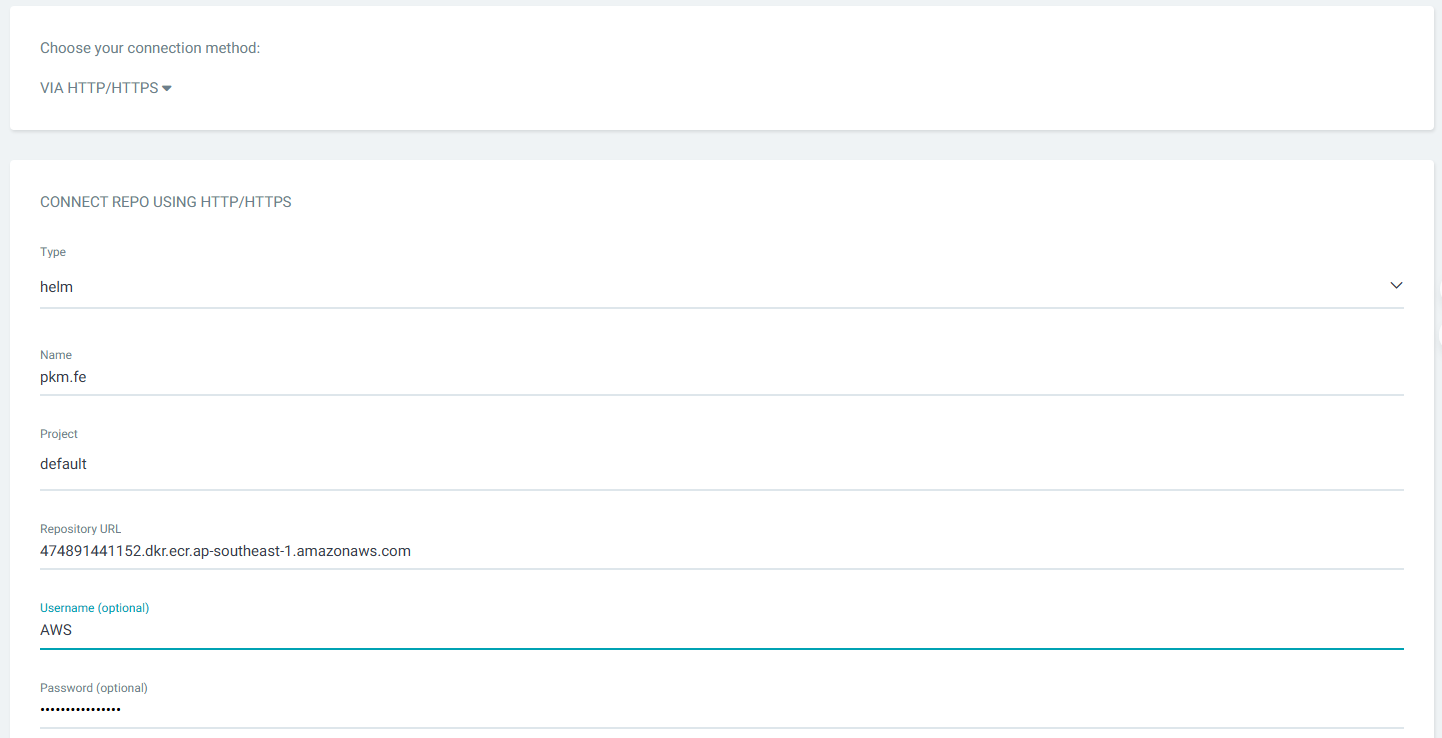
Username: AWS
Password: lấy bằng lệnh sau

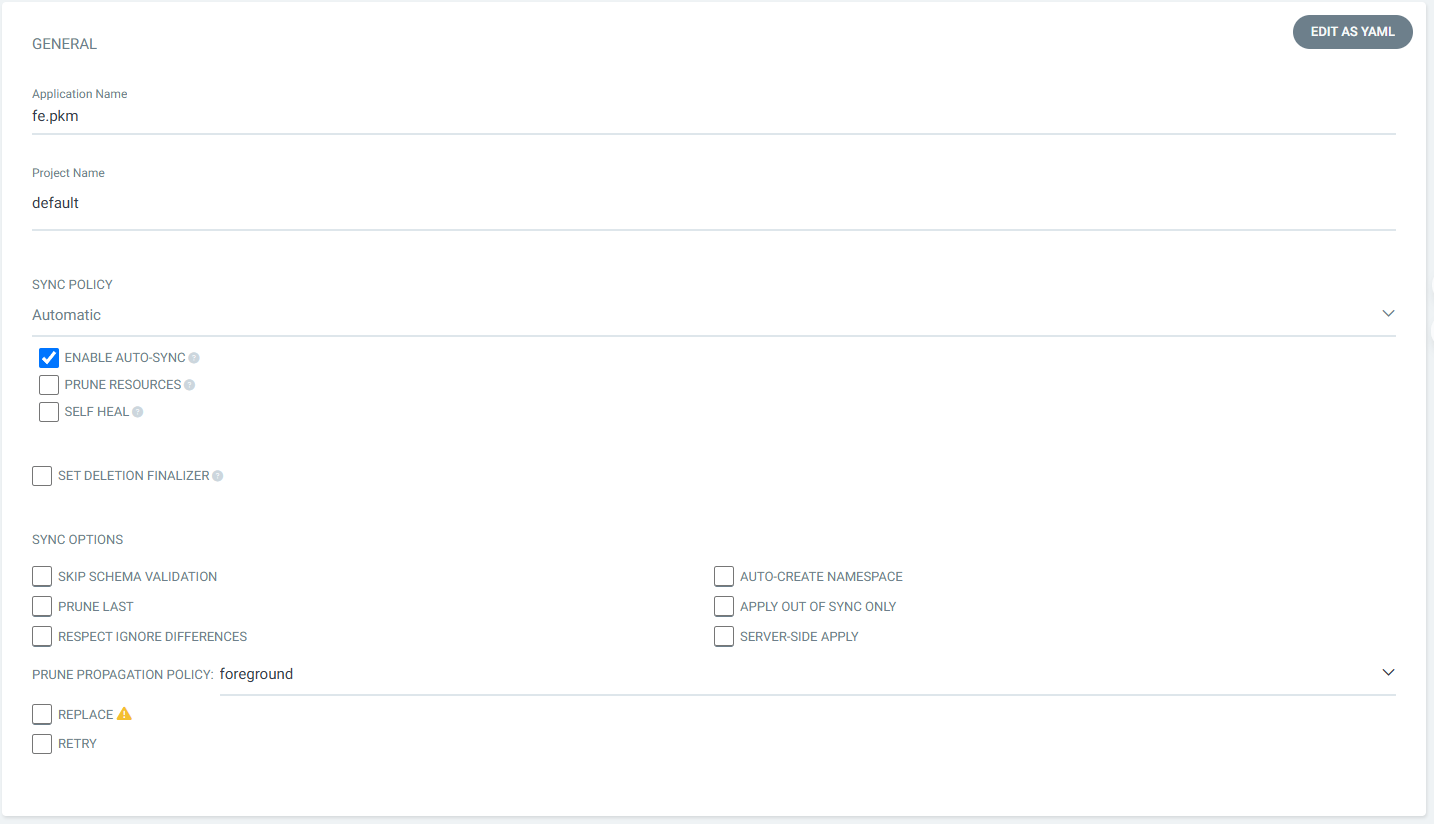
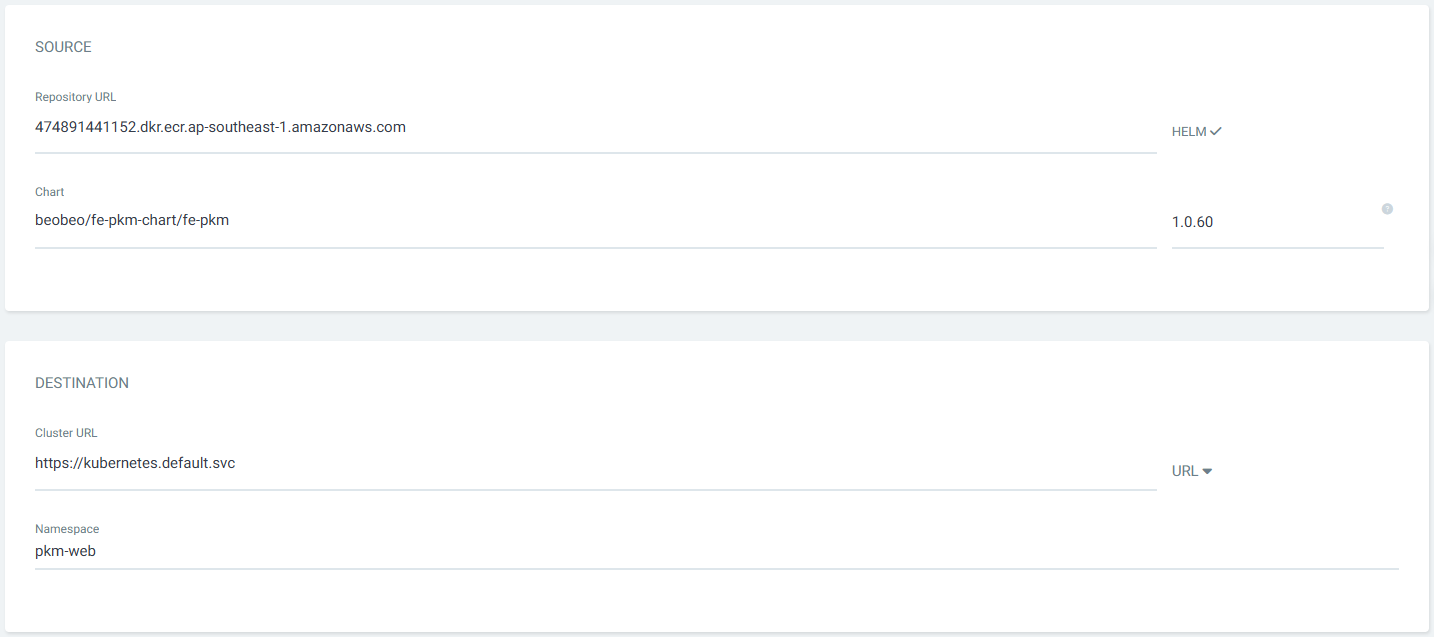
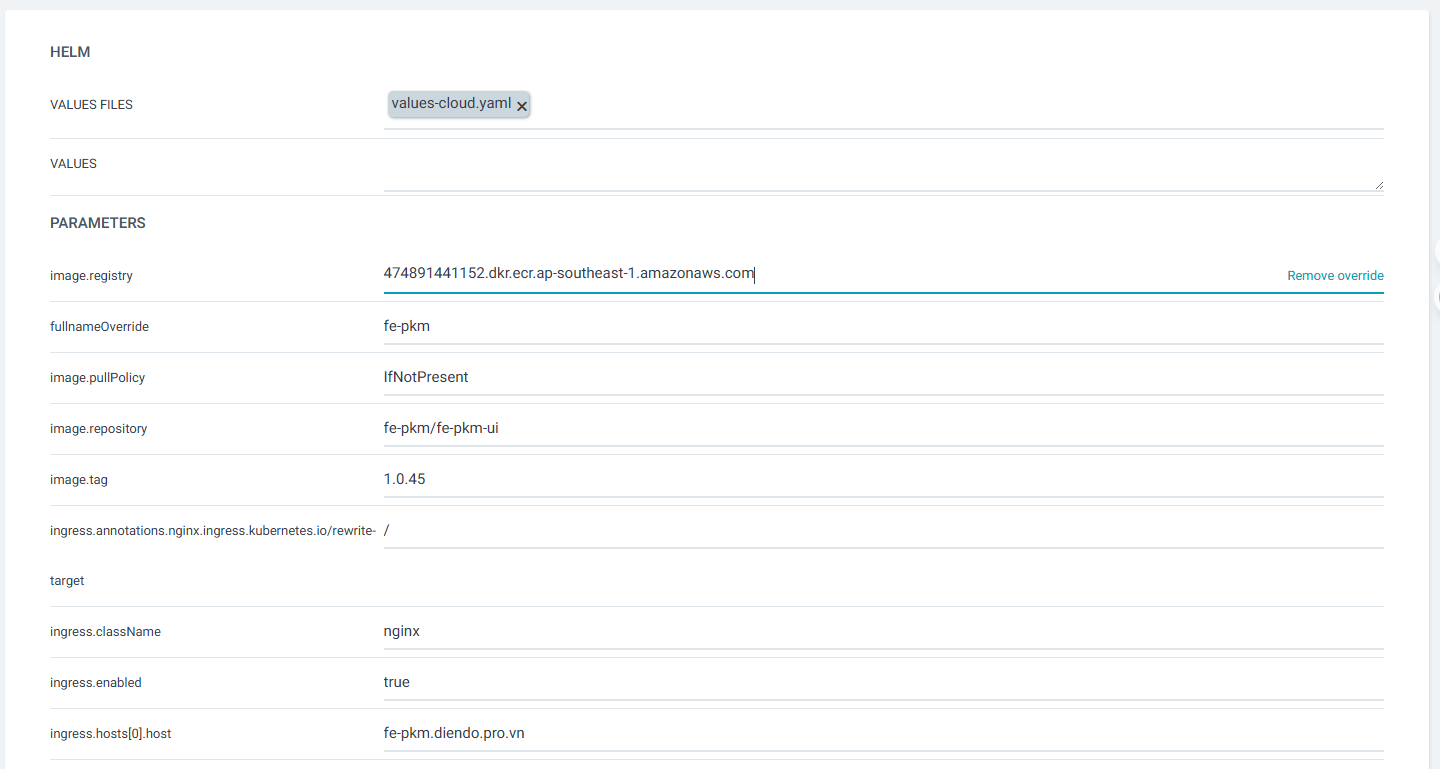
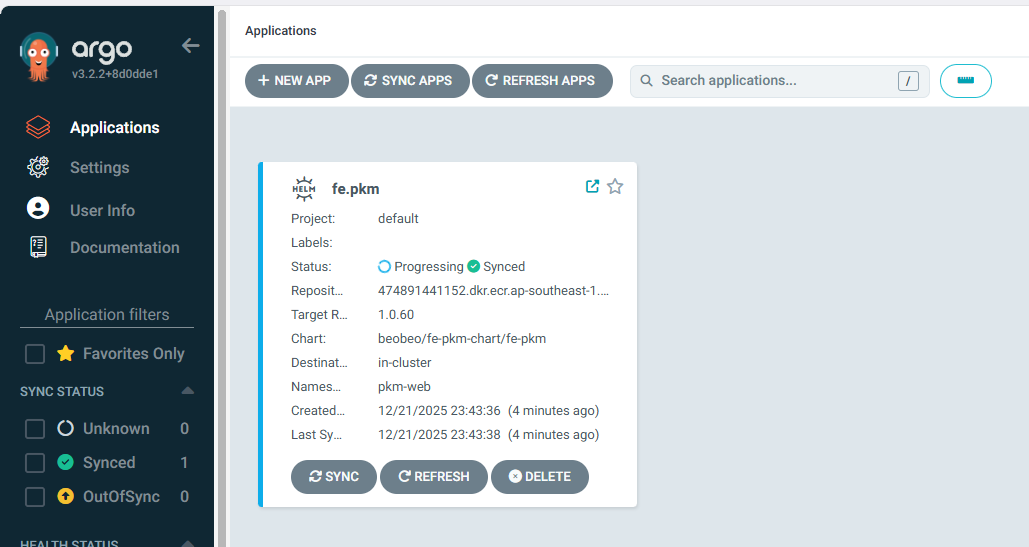
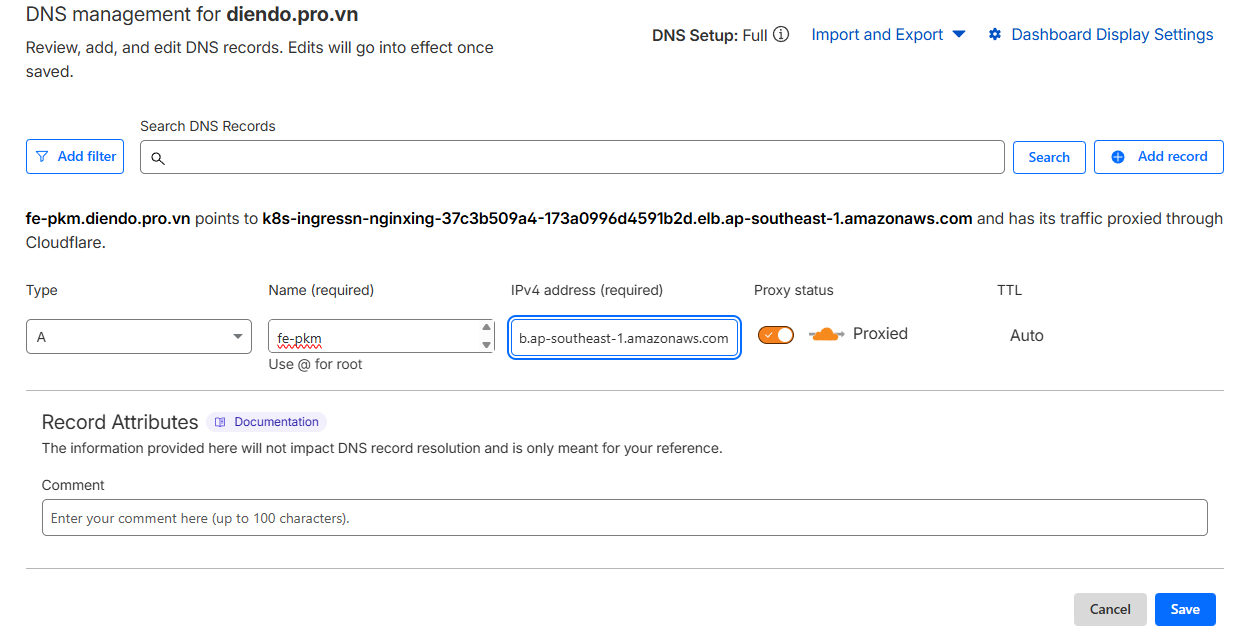
Lấy địa chỉ của Nginx Ingress Controller bằng lệnh kubectl get ingress -A

Copy địa chỉ này và trò bản ghi CNAME trên cloud flare
Truy cập bằng link https://fe-pkm.diendo.pro.vn