🎯 Mục tiêu của lab
- Làm chủ 5 Meta-Arguments cốt lõi:
providercountfor_eachdepends_onlifecycle
- Triển khai hạ tầng AWS có kiểm soát & mở rộng
- Hiểu rõ khi nào nên dùng từng Meta-Argument
1️⃣ Provider & Provider Alias – Multi-Region
provider "aws" {
  region = "ap-southeast-1"
}

provider "aws" {
  alias  = "dr_region"
  region = "us-east-1"
}
Ý nghĩa
- Provider mặc định dùng cho region chính
- Provider alias dùng cho Disaster Recovery
- Cho phép 1 project → nhiều region
📌 Đây là nền tảng cho kiến trúc Multi-Region / DR.
2️⃣ Variables & Complex Data Type – Tránh Hardcode
variable "project_config" {
  type = object({
    env            = string
    instance_size  = map(string)
    whitelist_ips  = list(string)
    instance_count = number
  })
}
Ý nghĩa
- Gom cấu hình thành 1 object duy nhất
- Dễ mở rộng
dev / prod - Giảm duplication & lỗi cấu hình
📌 Đây là tư duy configuration-driven infrastructure.
3️⃣ Random Provider – Giải quyết lỗi Duplicate Resource
resource "random_id" "lab_id" {
  byte_length = 4
  keepers = {
    env = var.project_config.env
  }
}
Vấn đề thực tế
- AWS không cho trùng tên Key Pair, SG, IAM User
- Khi destroy/apply nhiều lần → dễ lỗi
Giải pháp
- Gắn random suffix vào tên resource
- Terraform tự quản lý lifecycle
📌 Đây là pattern bắt buộc trong lab & CI/CD.
4️⃣ Lifecycle – Kiểm soát vòng đời Resource
lifecycle {
  ignore_changes = [tags]
}
lifecycle {
create_before_destroy = true
}Dùng để:
- Tránh destroy nhầm resource quan trọng
- Zero-downtime khi update Security Group
- Bỏ qua thay đổi không mong muốn
📌 lifecycle = công tắc an toàn của Terraform.
5️⃣ For_each – IAM User an toàn & ổn định
resource "aws_iam_user" "sysadmins" {
for_each = var.sysadmin_users
}Vì sao không dùng count?
- IAM User là identity
- Xóa/sửa danh sách user bằng
count→ rất nguy hiểm
📌 Quy tắc vàng:
Identity → for_each
Compute → count
6️⃣ Count – Scaling Compute
resource "aws_instance" "web_server" {
count = var.project_config.instance_count
}Ý nghĩa
- Scale số lượng VM theo biến
- Phù hợp với resource không cần định danh riêng
📌 count = horizontal scaling đơn giản.
7️⃣ Depends_on – Kiểm soát luồng triển khai
depends_on = [
aws_iam_user.sysadmins,
aws_key_pair.generated_key
]Khi nào cần?
- Khi dependency không thể suy ra từ attribute
- Đảm bảo IAM & SSH key sẵn sàng trước khi tạo EC2
📌 Dùng ít – nhưng dùng đúng lúc.
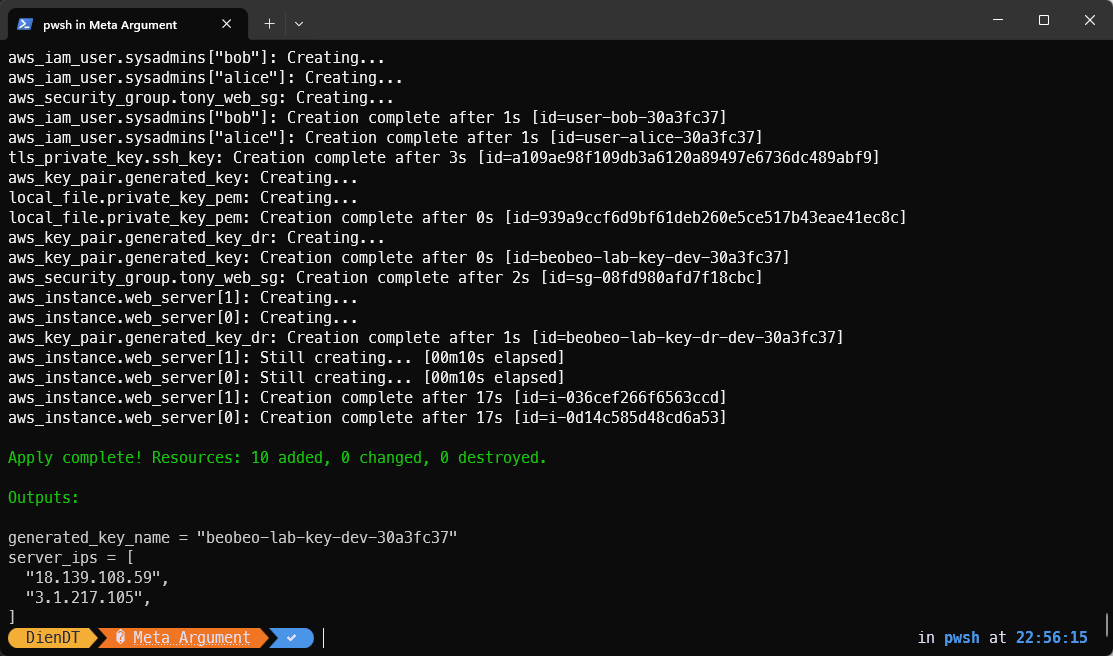
8️⃣ Kết quả đầu ra (Outputs)
output "server_ips" {
value = aws_instance.web_server[*].public_ip
}

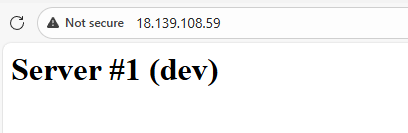
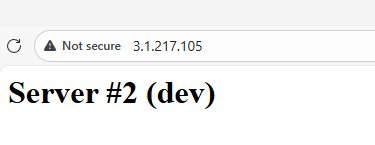
✅ Tổng kết tư duy Meta-Arguments
| Meta-Argument | Vai trò |
|---|---|
| provider | Chọn môi trường |
| count | Scale compute |
| for_each | Quản lý identity |
| depends_on | Điều khiển luồng |
| lifecycle | Bảo vệ hạ tầng |
💡 Kết luận
Resource mô tả cái gì cần tạo
Meta-Arguments quyết định Terraform sẽ hành xử ra sao
Nếu bạn hiểu Meta-Arguments, bạn không còn “viết Terraform” nữa –
👉 bạn đang điều khiển hạ tầng.
Full source code
# [5] COMMENT:
# Bài tập: Terraform Meta-Arguments Masterclass (Fixed Duplicate Error)
# Kịch bản: Triển khai Multi-Region, Scaling VM, IAM User và Network an toàn.
# [1] BLOCK: Terraform configuration
terraform {
required_version = ">= 1.0.0"
required_providers {
aws = {
source = "hashicorp/aws"
version = "~> 5.0"
}
# Fix Lỗi Duplicate: Cần provider random để tạo tên unique
random = {
source = "hashicorp/random"
version = "~> 3.0"
}
local = {
source = "hashicorp/local"
version = "~> 2.0"
}
tls = {
source = "hashicorp/tls"
version = "~> 4.0"
}
}
}
# --- PROVIDERS (META-ARGUMENT: ALIAS) ---
# Provider chính (Singapore)
provider "aws" {
region = "ap-southeast-1"
}
# [META-ARGUMENT 1: Provider Alias]
# Provider phụ cho Disaster Recovery (Virginia)
provider "aws" {
alias = "dr_region"
region = "us-east-1"
}
# --- VARIABLES ---
variable "project_config" {
type = object({
env = string
instance_size = map(string)
whitelist_ips = list(string)
instance_count = number
})
default = {
env = "dev"
instance_size = {
dev = "t3.micro"
prod = "t3.medium"
}
whitelist_ips = ["0.0.0.0/0"]
instance_count = 2 # Scaling: Tạo 2 servers
}
}
variable "sysadmin_users" {
description = "Danh sách user quản trị (Map)"
type = map(string)
default = {
"alice" = "DevOps-Lead"
"bob" = "SysAdmin-Intern"
}
}
# --- FIX: RANDOM ID GENERATOR ---
# Tạo chuỗi ngẫu nhiên 4 ký tự (ví dụ: a1b2) để gắn vào tên resource
resource "random_id" "lab_id" {
byte_length = 4
keepers = {
# Thay đổi env sẽ tạo ra ID mới
env = var.project_config.env
}
}
# --- RESOURCES ---
# 1. SSH KEY & KEY PAIR
resource "tls_private_key" "ssh_key" {
algorithm = "RSA"
rsa_bits = 4096
}
# Key Pair Chính (Singapore)
resource "aws_key_pair" "generated_key" {
# [FIX DUPLICATE] Tên Key = tony-lab-key-dev-a1b2
# Tránh trùng lặp với key cũ trên AWS
key_name = format("tony-lab-key-%s-%s", var.project_config.env, random_id.lab_id.hex)
public_key = tls_private_key.ssh_key.public_key_openssh
# [META-ARGUMENT 2: Lifecycle]
lifecycle {
# prevent_destroy = true # Bật cái này nếu là PROD để chống xóa nhầm
ignore_changes = [tags] # Ví dụ: Bỏ qua thay đổi về tags
}
}
# Key Pair Phụ (Virginia) - Dùng Provider Alias
resource "aws_key_pair" "generated_key_dr" {
# [META-ARGUMENT 1: Provider]
provider = aws.dr_region
key_name = format("tony-lab-key-dr-%s-%s", var.project_config.env, random_id.lab_id.hex)
public_key = tls_private_key.ssh_key.public_key_openssh
}
resource "local_file" "private_key_pem" {
content = tls_private_key.ssh_key.private_key_pem
filename = "${path.module}/generated-key.pem"
file_permission = "0400"
}
# 2. IAM USERS (Identity)
resource "aws_iam_user" "sysadmins" {
# [META-ARGUMENT 3: For_each]
# Dùng for_each cho IAM User thay vì Count để an toàn khi xóa/sửa list
for_each = var.sysadmin_users
name = "user-${each.key}-${random_id.lab_id.hex}"
tags = {
Department = each.value
Role = "SystemOperator"
}
}
# 3. SECURITY GROUP (Network)
resource "aws_security_group" "tony_web_sg" {
# [FIX DUPLICATE] Thêm random suffix vào tên SG
name = "tony-web-sg-${var.project_config.env}-${random_id.lab_id.hex}"
description = "Allow HTTP and SSH"
ingress {
from_port = 80
to_port = 80
protocol = "tcp"
cidr_blocks = ["0.0.0.0/0"]
}
ingress {
from_port = 22
to_port = 22
protocol = "tcp"
cidr_blocks = var.project_config.whitelist_ips
}
egress {
from_port = 0
to_port = 0
protocol = "-1"
cidr_blocks = ["0.0.0.0/0"]
}
# [META-ARGUMENT 2: Lifecycle]
# Tạo SG mới xong xuôi rồi mới xóa SG cũ -> Zero Downtime
lifecycle {
  create_before_destroy = true
}
}
# 4. COMPUTE (EC2)
data "aws_ami" "ubuntu" {
most_recent = true
owners = ["099720109477"]
filter {
name = "name"
values = ["ubuntu/images/hvm-ssd/ubuntu-jammy-22.04-amd64-server-*"]
}
}
# Bước 1: Chỉ định VPC bạn muốn dùng
data "aws_vpc" "selected" {
id = "vpc-00373062415c7146d" # ID VPC mặc định của bạn
}
# Bước 2: Tìm tất cả Subnet trong VPC đó và đặt tên nhóm này là "example"
data "aws_subnets" "example" {
filter {
name = "vpc-id"
values = [data.aws_vpc.selected.id]
}
}
resource "aws_instance" "web_server" {
# [META-ARGUMENT 4: Count]
# Scaling: Tạo nhiều máy ảo
count = var.project_config.instance_count
# [META-ARGUMENT 5: Depends_on]
# Flow Control: Bắt buộc chờ IAM User và Key Pair tạo xong
depends_on = [
  aws_iam_user.sysadmins,
  aws_key_pair.generated_key
]
ami = data.aws_ami.ubuntu.id
instance_type = var.project_config.env == "prod" ? var.project_config.instance_size["prod"] : var.project_config.instance_size["dev"]
# --- THÊM DÒNG NÀY ---
# Chỉ đích danh ID subnet bạn đang có
# Terraform sẽ lấy ID của subnet đầu tiên nó tìm thấy để điền vào đây.
# Bạn không cần copy paste ID thủ công nữa.
subnet_id = data.aws_subnets.example.ids[0]
# Ép buộc AWS cấp IP Public cho máy này, bất kể subnet cài đặt ra sao
associate_public_ip_address = true
vpc_security_group_ids = [aws_security_group.tony_web_sg.id]
key_name = aws_key_pair.generated_key.key_name
user_data = <<-EOF
#!/bin/bash
sudo apt-get update
sudo apt-get install -y nginx
echo "<h1>Server #${count.index + 1} (${var.project_config.env})</h1>" > /var/www/html/index.html
sudo systemctl enable nginx
sudo systemctl start nginx
EOF
tags = {
# Đánh số thứ tự cho VM bằng count.index
Name = "WebServer-${upper(var.project_config.env)}-${count.index}-${random_id.lab_id.hex}"
}
}
# --- OUTPUTS ---
output "server_ips" {
description = "Danh sách IP của các server (Splat Operator)"
value = aws_instance.web_server[*].public_ip
}
output "generated_key_name" {
description = "Tên Key Pair đã được tạo (có random id)"
value = aws_key_pair.generated_key.key_name
}